Inspecting Packages Before Installation with Bitray
Inspecting npm and PyPI archives with Bitray: scan evidence, installer policy decisions, and a test against a compromised LiteLLM wheel.
A practical look at scanning npm and PyPI archives, understanding the findings, and adding a review step to dependency workflows.
A package installation can do more than copy files. Installation can start build tools, run lifecycle hooks, and bring code into an environment that contains developer credentials or CI secrets. Those capabilities serve legitimate purposes, but they also create opportunities for a malicious package to act before an application ever starts.
Both npm and Python packaging allow package-supplied code to run during installation. npm documents installation lifecycle events including preinstall, install, and postinstall. pip’s secure-install guidance explains that processing distributions can involve running package-supplied code. npm lifecycle documentation, pip secure-install guidance.
The downloaded package archive is a useful place to inspect installation behavior. What source files did the publisher actually ship? Which commands might run? Does a suspicious-looking string belong to documentation, or does it participate in executable behavior?
Bitray is a Python project for inspecting package archives without importing or running the packaged code. Its core scanner reads npm tarballs and PyPI wheels, ZIP distributions, and source-distribution tarballs. The direct archive-scanning command examines the source files and metadata inside each archive.
The goal is to give developers and reviewers useful evidence before they approve an artifact for installation. Examining the code and metadata inside the particular artifact adds a different kind of information to a workflow that already checks dependency versions and vulnerability advisories.
There are several practical places to use Bitray:
- Before adding a dependency: inspect a downloaded archive and investigate any flagged behavior.
- During a release review: examine the artifact a publisher shipped, including its packaging metadata and executable files.
- In CI: scan an already-downloaded artifact and use a structured policy report to stop for review or block installation.
- During an investigation: save an explanation with indicators and source excerpts to support a human review.
Bitray combines archive inspection, weighted features, focused behavior detectors, and policy checks. The distinction between vocabulary and behavior matters. Networking and process execution are common in legitimate software, so their presence alone can be misleading. The implementation contains checks intended to connect source data, activation context, and consequential operations. An optional local model contributes to selected decisions when its dependencies and artifacts are available.
For automation, Bitray separates its binary verdict from an installer policy decision. The policy report supports three actions:
| Decision | Gate exit code | Meaning for a workflow |
|---|---|---|
allow |
0 | No blocking evidence was found; continue according to local policy. |
review |
2 | Stop for a human decision or investigate an operational failure. |
block |
3 | Refuse installation based on the reported evidence. |
A CI job can use the installer policy decision to decide whether an artifact proceeds. The job should handle all three outcomes explicitly. The core main.py scan command writes the verdict. The scan command’s process exit status is not the malware decision.
The confidence field is a scoring output, not a measured guarantee that a package is safe. Confidence values, including 1.0, are derived from scoring and policy decisions.
Bitray’s results need to be read alongside the evidence and inspection limits. An allow result means the scanner found no actionable evidence within its analysis. Static inspection has coverage limits and can produce both missed detections and false positives. The useful output is the combination of a decision, an explanation, and an artifact a reviewer can examine.
A small demonstration
Two small demonstration packages show the scanning workflow. The ordinary package exports a simple addition function. The encoded-execution package decodes a base64 string and passes the decoded source to eval.
Both fixtures are harmless. The decoded string only prints Bitray demo. The encoded-execution fixture deliberately exercises a conservative encoded-execution rule. The fixture is not a real malware sample. The fixture generator writes source text into archives and never executes the source.
The demonstration archives are ordinary.tgz and encoded-execution.tgz under results/blog-demo/. The ordinary package contains:
module.exports = (left, right) => left + right;The encoded-execution package contains:
const payload = 'Y29uc29sZS5sb2coJ0JpdHJheSBkZW1vJyk7';eval(atob(payload));With the scanner’s development environment prepared, scan the ordinary package:
python combined-scanner/main.py scan --ecosystem npm --input results/blog-demo/ordinary.tgz --output results/blog-demo/ordinary.verdict.json --report results/blog-demo/ordinary.report.jsonBitray returned a clean verdict for the ordinary package.
{"schema_version":"1","verdict":"clean","confidence":1.0}The ordinary package’s installer-facing report recommended allow with the evidence class no_actionable_evidence.
Next, inspect the encoded-execution package and save an explanation:
python combined-scanner/main.py scan --ecosystem npm --input results/blog-demo/encoded-execution.tgz --output results/blog-demo/encoded-execution.verdict.json --report results/blog-demo/encoded-execution.report.json --debug --debug-output results/blog-demo/encoded-execution.explanation.jsonBitray returned a malicious verdict for the encoded-execution package.
{"schema_version":"1","verdict":"malicious","confidence":0.5}The encoded-execution package’s explanation identified standalone obfuscation.
{ "name": "_isolated_obfuscation", "description": "standalone obfuscation reconstructs executable behavior"}The focused behavior detector changed the initial numeric decision. The explanation recorded connected_proof_override, and the installer-facing report recommended block.
An explanation helps a reviewer understand the decision and the rule’s limits. The encoded-execution fixture was flagged because encoded data reached execution. The decoded behavior is harmless, even though the scanner flags the execution pattern. A finding supplies something concrete to investigate. The finding does not establish the author’s intent.
The demonstration results illustrate the rules and connected-behavior path. The results were captured using Python 3.12 with the optional learned-model dependencies unavailable and are not a benchmark of detection accuracy.
For users who prefer the packaged environment, the project includes a Docker build with pinned Python model dependencies. On a Linux shell with Docker available, the equivalent archive scan is:
docker build -f Dockerfile.fused -t bitray-scanner:local .
docker run --rm --network none --read-only \  --user "$(id -u):$(id -g)" \  -v "$PWD/results/blog-demo:/work:ro" \  -v "$PWD/results/blog-demo:/results" \  bitray-scanner:local scan \  --ecosystem npm \  --input /work/encoded-execution.tgz \  --output /results/docker.verdict.json \  --debug
The Docker command gives the scanner access to the archive and a location for output, with networking disabled. The source mount provides read access to the archive, while the results mount provides a location for the scan output. --network none disables container networking for the scan. The Docker command is the packaged workflow. The captured outputs above came from the direct Python run.
The same CLI also inspects PyPI archives without making package installation part of the inspection step. Change --ecosystem to pypi and supply a wheel or source archive.
The install_gate.py command translates installer policy reports into process exit codes.
python combined-scanner/install_gate.py --ecosystem npm --input results/blog-demo/encoded-execution.tgzIn the demonstration, the ordinary fixture returned exit code 0 and the encoded-execution fixture returned 3.
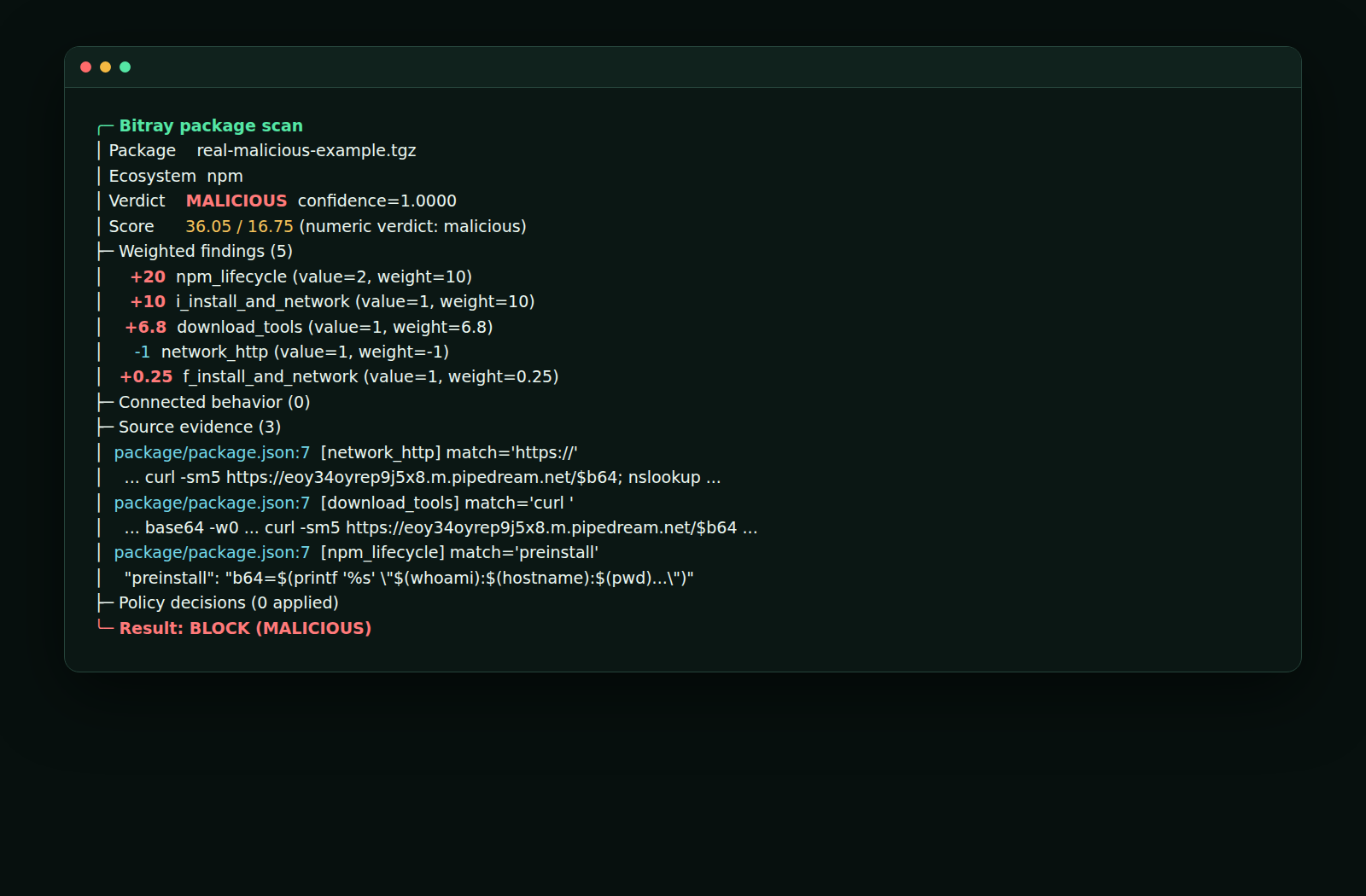
The debug output shows the findings, policy decisions, and source excerpts together.
A real-world example: the LiteLLM supply-chain compromise
We tested Bitray against the compromised LiteLLM 1.107.0 Linux wheel from the recently reported supply-chain attack. The release carried a credential stealer and a backdoor in files installed alongside the legitimate library. A .pth startup hook and sitecustomize.py allowed the injected code to run when Python started, including in processes that did not import LiteLLM. SafeDep’s analysis of the compromise.
Bitray flagged encoded payload execution in two of the injected Python files without installing the package or executing its contents. The test used the original published wheel, with its SHA-256 checked against the reported artifact hash. The tested development build read all 3,947 files. The screenshot shows the connected-behavior portion of the output, with the keyword weights and unrelated sections omitted.
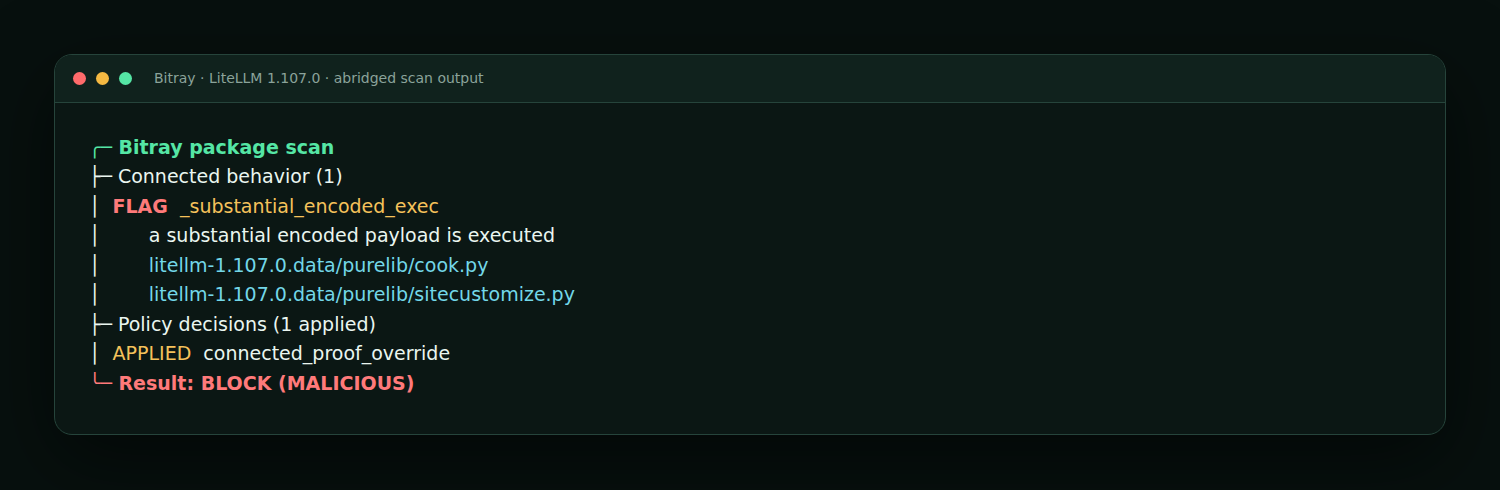
With enforcement enabled, Bitray’s pre-install gate would have refused installation of the compromised wheel. The installer-facing report recommended block, which would stop installation before the injected files were placed in the Python environment.
The block was supported by a connected behavior finding in the payload files. The Python AST check connected a substantial encoded payload to a decoding operation consumed by an execution call inside the shipped artifact. The finding describes what the packaged code would execute at runtime. The scanner did not execute the payload. The finding gave a reviewer specific files and behavior to investigate. Reading every file did not mean every file received exhaustive analysis.
Bitray is still being hardened. Current work focuses on inspection coverage and installer integrations. This walkthrough uses the direct archive CLI and gate, which do not resolve or install dependencies. The transparent package-manager shims need further work before they can serve as a mandatory enforcement boundary.
We haven’t decided whether to release the implementation publicly.
The workflow keeps the inspection evidence alongside the decision. Keep the verdict and explanation together so the next person reviewing that dependency can understand the decision.
How Bitray compares
A single detection says little on its own, so we also ran Bitray against three public package-malware scanners — GuardDog, OSSGadget, and malcontent — over a frozen set of 1,000 npm and PyPI packages (400 malicious, 600 clean). Every scanner saw only the archive bytes, under network isolation, with a 30-second ceiling. Recall counts an execution error as a missed detection; the verdict table keeps errors separate.
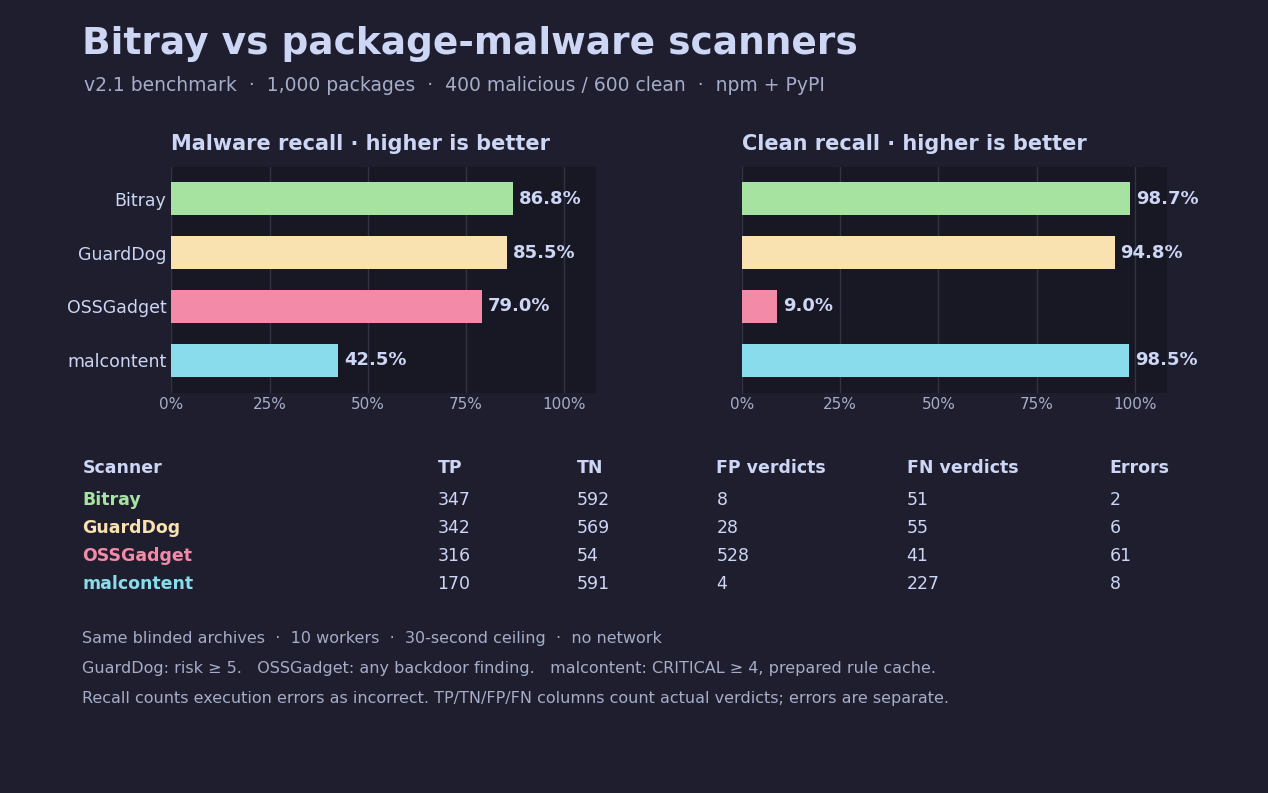
On this set Bitray recovered 86.8% of the malicious packages while passing 98.7% of the clean ones — the best balance of the group. OSSGadget reached comparable recall only by flagging almost everything (9% clean recall), and malcontent stayed precise but missed well over half the malware. This is one benchmark with its own selection bias, not a general accuracy claim; the demonstration above is still the honest unit of evidence.
Acknowledgements
Thanks to Matt Eckert for helping draft and proofread this post.
The benchmark’s malicious samples are re-packaged from two public sources: pypi_malregistry for PyPI and the pkgradar feed for npm. The dataset layout and the encrypted-sample convention follow Datadog’s malicious-software-packages-dataset.
The malicious subset is published as Bitray Malware Samples: 400 npm and PyPI packages, each stored as an encrypted ZIP (password infected). It contains live malware — do not run the contents.